Food Flyer Bundle: Your All-in-One Design Toolkit
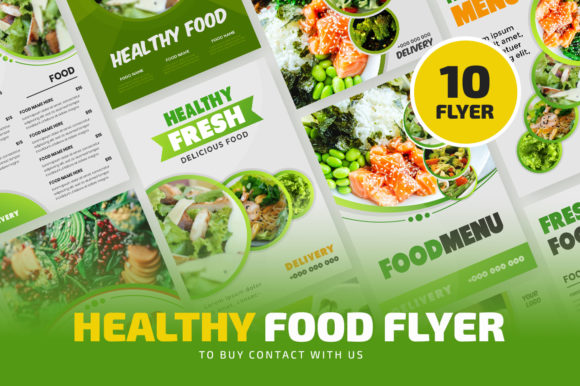
Creating marketing materials for a food business often feels like a race against time. You have a new menu, a seasonal promotion, or a special event, and you need a professional-looking flyer fast. The Food Flyer Bundle is a collection of ten distinct, high-quality A4-sized templates designed specifically for this purpose. It’s not just a set of pretty pictures; it’s a structured design asset that gives you a serious head start on brand identity and marketing campaigns.
Beyond the Template: Understanding the Bundle's Core
At its heart, this bundle is built for practicality. Each of the ten files is organized with well-structured layers, meaning you won’t waste hours digging through a chaotic file to change a color or swap an image. The use of free fonts is a significant practical advantage, eliminating the extra cost and licensing headaches that can come with premium font packages. This makes it an accessible starting point for small business owners, entrepreneurs, and crafters who are building their visual presence from the ground up.
The style leans towards a clean, modern aesthetic that works across various food niches—from artisan bakeries and coffee shops to fine dining and food trucks. The visual personality is versatile: it can feel rustic and handcrafted or sleek and contemporary, depending on the images and color choices you implement. Because the templates are 100% editable in Adobe Illustrator (from CS to the latest version), you have complete control to adapt them to your specific brand identity. This level of customization is what separates a generic template from a powerful creative font and layout system.
Practical Applications: Where This Bundle Shines
The true value of the Food Flyer Bundle is realized in its application. For a marketer or content creator, these files are a foundation for social media graphics and digital ads. You can quickly resize elements for Instagram posts or Facebook promotions, maintaining visual consistency across platforms. For a publisher or blogger, the layouts are ideal for editorial design—think recipe cards, event announcements, or partnership features in a digital magazine.
For physical products, the A4 format is perfect for print materials like in-store menus, takeout inserts, or community board flyers. The high-quality output ensures your designs look crisp and professional, which directly influences brand perception. A well-organized flyer communicates reliability and attention to detail before a customer even tastes your food. This bundle essentially provides a font pairing and layout system that guides you toward a balanced visual hierarchy, ensuring your message is clear and engaging.
Getting Started: A Step-by-Step Guide
Using the bundle effectively requires a simple but important workflow. First, before opening any file, install the recommended free fonts. This prevents missing font errors and keeps the design intact. Once the fonts are installed, open your chosen file in Adobe Illustrator.
Customization is straightforward:
- Change the Logo: Use the Selection Tool (V) to click on the existing logo. Delete it, then go to File > Place to insert your own logo file. Position and scale it appropriately.
- Edit Texts: Select the Type Tool (T), click on any text block you wish to change, and type your new information. This is where you input your business name, promotion details, and contact information.
- Adjust Colors: Select any object—a background shape, a text element, an accent line. Open the Color Palette (Window > Color) and choose a new fill or stroke color that matches your brand palette.
Remember, the images shown in the preview are not included. This is standard practice, as it allows you to use your own high-quality photos of your food, which is far more authentic and effective for marketing. The templates are designed to frame your imagery beautifully, using typography and layout to create focus.
Making It Your Own: Strategic Considerations
While the bundle provides a strong starting point, your unique touch will make it effective. Consider the readability of your final text. The provided sans serif and serif font options are chosen for clarity, but always test your flyer at the actual print size. Ensure there is enough contrast between text and background colors.
Think about font pairing beyond the template's suggestions. You might use a bold display font for your headline and pair it with a clean, readable body font. The goal is to guide the viewer's eye naturally from the most important information (the offer) to the supporting details (the date, location, and contact).
Finally, use this bundle to build consistency. By creating a set of flyers with a unified style, you reinforce your brand identity. Whether you're designing for a single event or a series of seasonal promotions, maintaining a consistent look across all your design assets—from flyers to social media graphics—builds recognition and professionalism. This bundle isn't just about making one flyer; it's about equipping you with a system to communicate your brand effectively and efficiently, time after time.